Instagram “Limits” Now Lets You Mute Everyone Except Close Friends
Instagram “Limits” Now Lets You Mute Everyone Except Close Friends
 |
|
Instagram is giving users more control over their experience with an update to its “Limits” feature. After a two-year gap, “Limits” now allows you to mute messages and comments from everyone except your close friends for a duration of up to four weeks. This is a significant update, especially for creators who often face negativity or harassment on the platform.
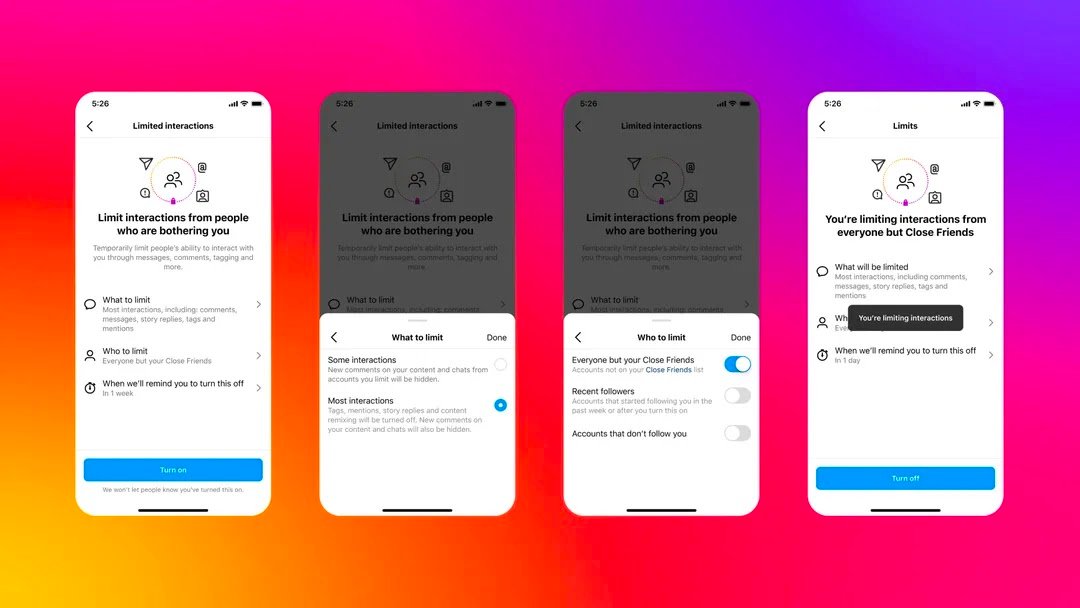
Previously, “Limits” could only be used to hide comments and messages from accounts that didn’t follow you or from recent followers. With this update, you can now choose to mute everyone except your Close Friends. This means you won’t see any comments or messages from those you haven’t added to your close friends list, but they will still be able to interact with your posts as usual.Interesting thing, they won’t be even notified that you’ve muted them.
Here’s How to Mute someone on Instagram
 |
|
- Open the Instagram app and tap on your profile picture in the bottom right corner.
- Tap on the hamburger menu (three horizontal lines) in the top right corner.
- Select “Settings” and then “Privacy.”
- Tap on “Limits.”
- Choose “Everyone but Close Friends” under “Who can interact with you?”
- Select the duration for which you want to enable Limits (from 24 hours to 4 weeks), but you can extend it.
- Tap “Turn on Limits” to activate the feature.
Taking Control of Your Instagram Experience, Especially as a Creator
The updated “Limits” feature is a valuable tool for anyone who wants to curate a more positive and manageable Instagram experience. It’s particularly beneficial for creators who are more susceptible to harassment and negativity online. This feature was introduced purely to avoid harassment, as Adam Mosseri said, “Limits is a feature that lets you hide comments and DMs from people who don’t follow you or who only just followed you. It’s intended to prevent harassment – especially towards creators and public figures – during spikes of abuse “.
Whether you’re dealing with trolls, excessive criticism, or simply want a break from the noise, muting everyone except your Close Friends can provide a welcome respite. This allows you to focus on creating content and interacting with your most supportive audience. Recently, Meta also introduced a Meta AI Chatbot for all its social media platform inclduing Isntagram.