Microsoft makes file sharing easier with a new ‘drag tray’ in Windows 11
Microsoft makes file sharing easier with a new ‘drag tray’ in Windows 11
A new drag tray will appear on the top whenever you select a file to share from File Explorer or the desktop on Windows 11.
 |
|
This tray intelligently curates a selection of relevant applications, enabling users to seamlessly drop their files into the desired destination. Whether it’s sharing a document via email, sending a photo through a messaging application, or simply organizing files between folders, this feature noticeably streamlines the workflow. For those seeking advanced options, the ‘More…’ button provides direct access to the familiar Windows share window. This enhanced approach reduces friction and enhances efficiency, making file sharing a more intuitive and fluid experience.
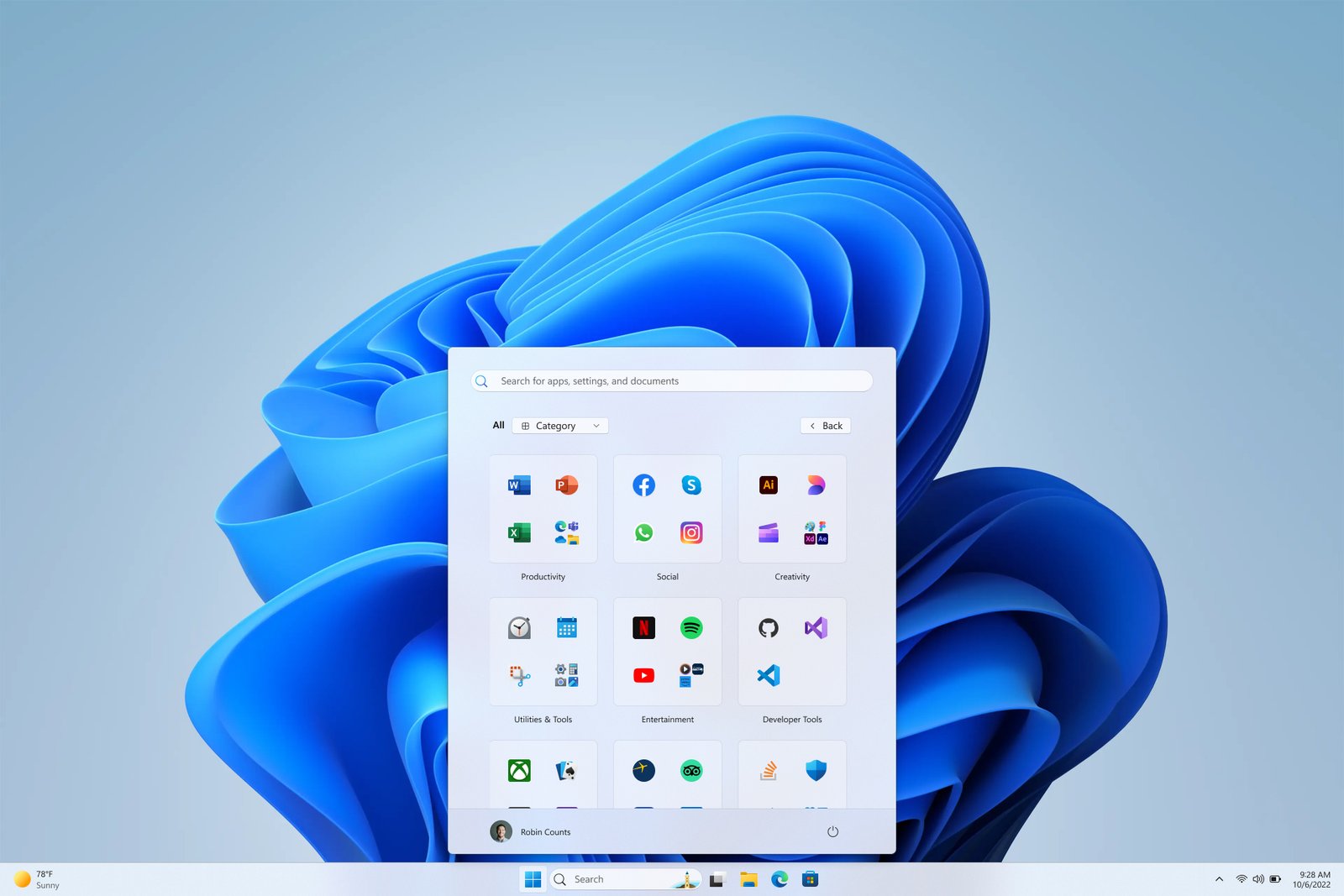 |
| New Category view of All apps in the Start Menu of Windows 11. Image: Microsoft |
This refined feature is poised to significantly enhance the file-sharing experience within Windows 11. This update is a valuable addition to the Windows 11 user ecosystem. Alongside this enhancement, the Windows 11 Preview Build also introduces a redesigned layout for applications within the Start menu. It presents two new organizational views: grid view and category view. In grid view, applications are presented in alphabetical order for quick access, while category view, as the name suggests, categorizes applications based on usage patterns, such as grouping social media applications like Instagram, Facebook, and WhatsApp into a dedicated section.