

WhatsApp introduces Custom Chat Lists – New Way to
Organize Your Chats
This new feature will allow you to create your own chat list on WhatsApp.
 |
|
In this article
WhatsApp’s latest update introduces a game-changing feature that will revolutionize the way you organize your chats: Custom Lists.
Tired of scrolling through endless chat lists? Frustrated
with finding important messages buried under a mountain of notifications? Fear
not, WhatsApp has the solution. With Custom Lists, you can now effortlessly
categorize your chats into personalized groups, making it easier than ever to
stay organized and focused.
How Custom Lists Work
Custom Lists are the natural evolution of chat filters, a
feature introduced earlier this year. But unlike filters, which are temporary,
Custom Lists are permanent. You can create as many lists as you need and
customize them to your liking.
 |
|
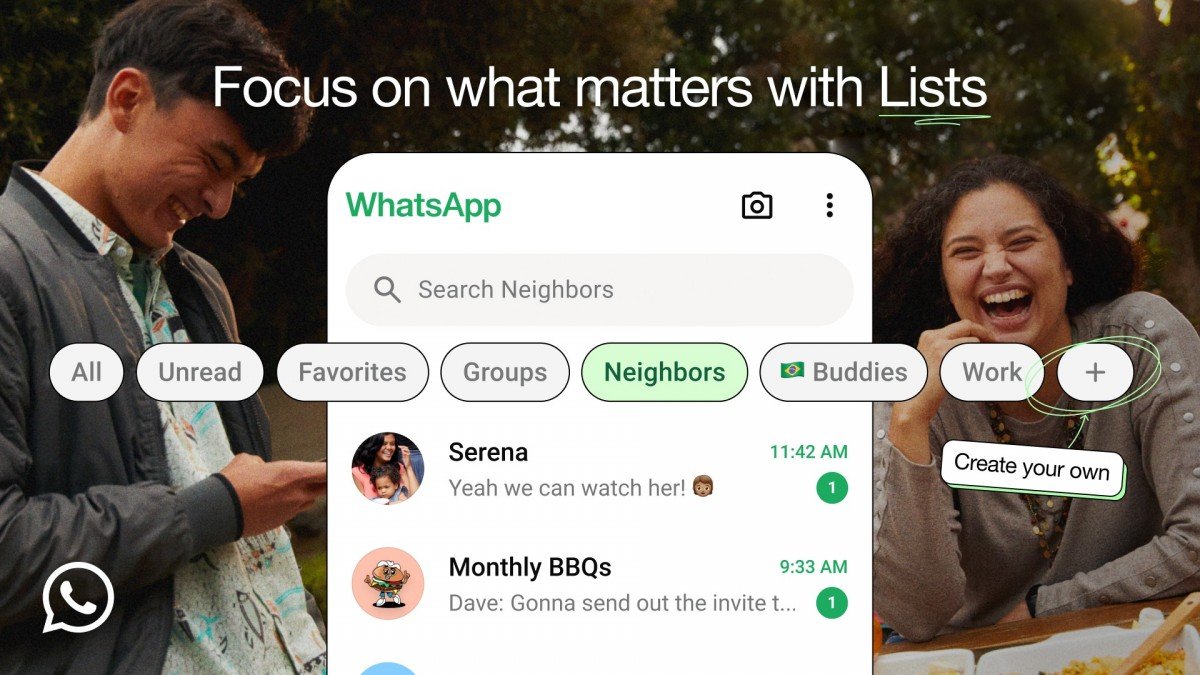
To create a new list, simply tap the “+” button in
the filter bar at the top of your Chats tab. From there, you can add both group
and individual chats to your list. To edit an existing list, long-press on it
and make the necessary changes.
Why Custom Lists Are a Game-Changer
Custom Lists offer a multitude of benefits:
- Enhanced
Organization: Categorize your chats by topic, relationship, or any
other criteria you prefer. - Improved
Productivity: Quickly access important conversations without the
clutter. - Personalized
Experience: Tailor your WhatsApp experience to your specific needs.
As this feature is rolling out gradually, it may take a
few weeks to reach all WhatsApp users.
So, get ready to streamline your chat experience and take
control of your digital life with WhatsApp’s new Custom Lists feature.