


It’s not just notifications anymore. Send voice, see photos, and get stickers right from your watch.
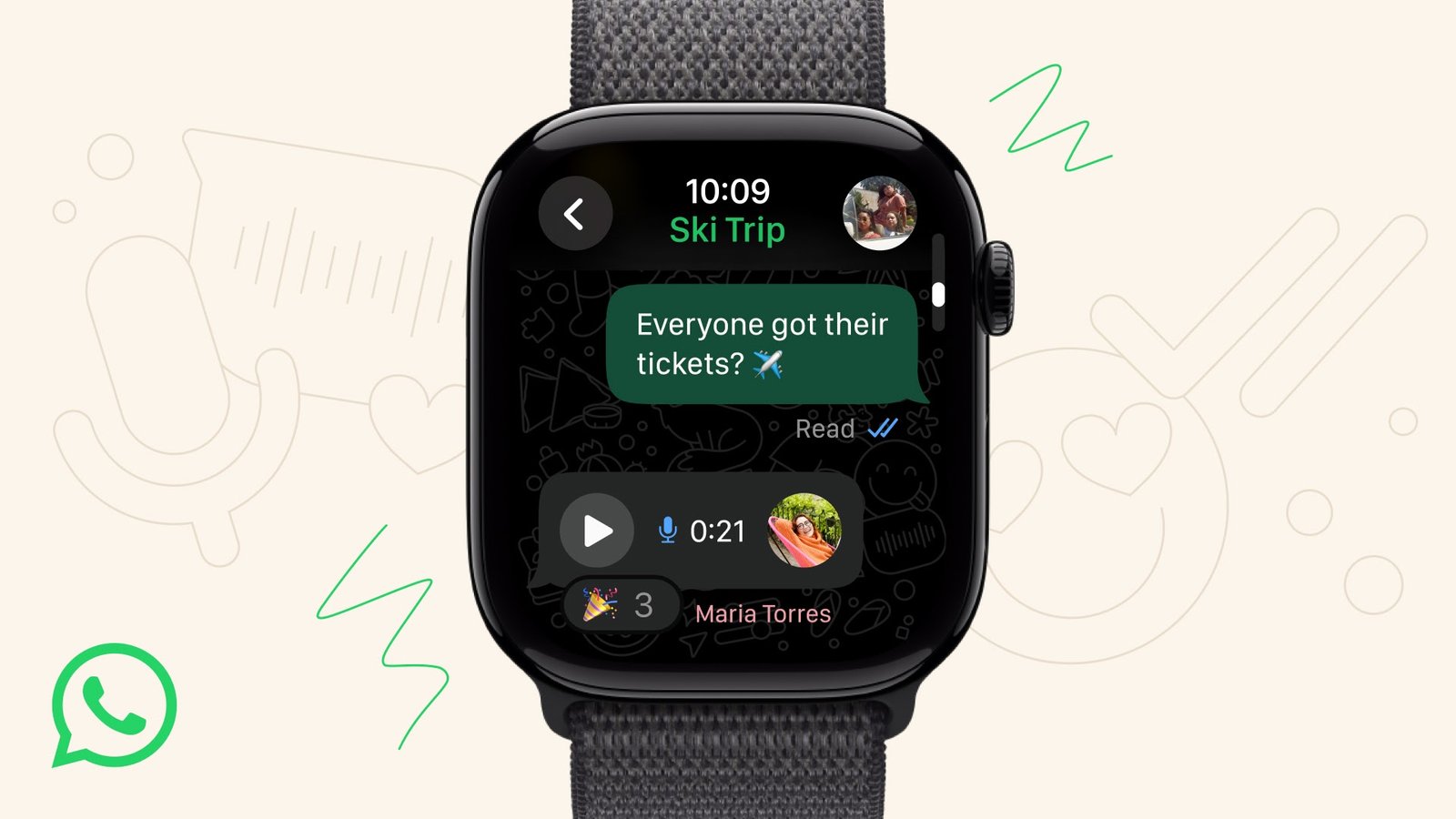 |
| WhatsApp’s new watchOS 10 app with voice messages in action. Image: Meta | Licensed by: Kinghacks365 |
In this article
basic mirror app for WhatsApp notifications. The messaging app, WhatsApp, has
just launched an official companion app for the Apple Watch. Now you can get
all your notifications and actually interact by sending and receiving voice
messages, syncing chat history, and starting new conversations directly from
your wrist.
Today, parent company Meta announced the long-awaitedofficial WhatsApp companion app for Apple Watch, which now lets you not only
see notifications from your chats but also interact with them. This new app
lets you easily chat with your recipients using voice messages, text, call
notifications, and even share media and stickers. This new app is a complete
advantage for a better experience directly from your watch. WhatsApp
acknowledged this, stating you can “stay on top of your WhatsApp chats
without pulling out your iPhone.” The features of the new WhatsApp
companion app for Apple Watch are listed below.
What’s New: The Key Features You Actually Get
The WhatsApp companion app for Apple Watch comes with
numerous features that were clearly absent in the old (mirrored) notification
method. Let’s take a look at what new features we have.
Send and Receive Voice Messages
You can now easily send and receive voice messages directly
from your Apple Watch using the new companion app. This is a basic and
important feature that was missing and not possible with the old notification
mirror method.
Access Your Chat History
Another feature considered important is that the new app
lets you easily access your chat history right where you left off, which wasn’t
possible previously. With your chat history available, you can continue your
conversation without any confusion.
Start New Chats & Reply
See an important message and want to reply immediately from
your wrist? Don’t worry. The new companion app lets you easily reply to
messages and share your emotions with emojis and stickers. You are also able to
view stickers from recipients. This also includes emoji reactions to messages.
View Images
Unlike the old method, where images sent in chats were not
visible on the Apple Watch, you are now able to view images and media shared in
your conversations. A very basic and necessary feature—kudos to WhatsApp for
adding it.
How to Install the Official WhatsApp App on Your Apple Watch
The question in your mind now is how to install the official
WhatsApp app on your Apple Watch. WhatsApp explicitly stated that
“WhatsApp for Apple Watch will be available for any Apple Watch Series 4
or later running watchOS 10 or later.” The first step is to make sure you
have the right device on your wrist. You can then download it with these easy
steps.
- Prerequisite: Ensure your iPhone has the latest version of
WhatsApp (from the App Store) and your Apple Watch has the latest watchOS 10
(or later). - Open the “Watch” app on your iPhone.
- Scroll down to the “Available Apps” section.
- Find “WhatsApp” in the list and tap the
“Install” button. - Wait for the app to appear on your Apple Watch home screen.
Old vs. New: Why This Is a Game-Changer
The major difference between the old notification mirror
method and the official WhatsApp companion app is that the old method was just
for notifications—no chat replies, no voice messages, nothing. But the new app
is a full-fledged app made specifically for the Apple Watch. The company also
repeated its slogan: “As always, your personal messages and calls remain
private with end-to-end encryption.” A breakdown of the differences is
below.
|
Feature |
Old Method (Notification Mirror) |
New Official Companion App |
|
Voice |
Cannot listen |
Yes (Listen |
|
Chat History |
Only new |
Yes (Syncs |
|
Start New |
No |
Yes |
|
View Images |
No / Blurry |
Yes (Full |
|
App Icon |
No |
Yes (On watch |
As this feature is just beginning, WhatsApp is promising
future updates: “we’ll keep improving WhatsApp for Apple Watch based on
your feedback.“
Have you downloaded this app yet? Share your
thoughts in the comments section below