

In this article
Standard AI image generators break down the moment you ask for precise graphic design. You type a prompt, and the model attempts to render textures, colors, lighting, and typography all at the exact same time. The result is typically a flattened PNG with garbled text and awkward spacing.
Canva shifts this dynamic entirely with Craft, its first in-house foundation model launched globally on October 22, 2026. Built directly into the Dream Lab interface, Canva Craft abandons the traditional single-pass approach. Instead, it relies on a two-stage planning architecture that maps out editable layouts before a single pixel renders.
Last week, I tried generating a simple product launch banner for a SaaS client using a leading single-pass diffusion tool. The prompt asked for three pricing tiers and a clean header. While the background lighting looked cinematic, the text looked like melted plastic, and the central icon bled right through the headline. I ended up trashing the AI output, opening a blank canvas in standard Canva, and rebuilding the entire layout by hand for two hours just to meet the deadline.
Why It Matters: The End of the “Flat PNG” Bottleneck
For years, generative AI has functioned like a slot machine: you pull the lever and hope the text doesn’t look like alien hieroglyphics. If a client likes 90% of an AI-generated poster but wants the headline moved two inches to the left, a traditional generator forces you to re-roll the entire prompt—destroying the original composition in the process.
Canva Craft solves the post-generation editing crisis. By separating layout logic from pixel rendering, it bridges the gap between raw AI concepts and client-ready commercial production. You no longer get a dead, flat image; you get a living project file.
Target Audience: Who Actually Needs This?
- Great for Performance Marketers & Social Media Managers: Anyone running high-volume ad variations who needs strict brand spacing and instant text swaps across multiple aspect ratios.
- A Lifesaver for Localization Teams: With native support for 55 languages locked into structural text boxes, global campaigns no longer break layouts when translating from English to German or Arabic.
- Bad News for “Prompt Engineer” Purists: If your entire workflow revolves around memorizing obscure rendering tags just to trick an image model into spelling a five-letter word, Craft makes that friction obsolete.
How Two-Stage Planning Actually Works
The primary reason Craft excels at typography and spatial alignment comes down to its architectural workflow. The system operates in two distinct phases:
First, a composition planning model reads the text prompt and generates a structural blueprint. It dictates where elements belong, their relative scale, the visual hierarchy, and the exact spatial coordinates for typography.
Second, the dedicated rendering model takes that blueprint and generates the final image at up to 2K resolution. It supports over 30 aspect ratios, ranging from vertical mobile screens to horizontal presentation slides. By locking the layout rules before rendering begins, Craft ensures text remains legible across its 55 supported languages and elements stay exactly where you requested.
Testing the Spatial Hierarchy in Dream Lab
To see if this architecture holds up under strict constraints, I ran a layout test using inside the Dream Lab interface.
The prompt required absolute spatial obedience: “A vertical event poster for a tech conference. Deep charcoal background with subtle grid lines. At the top, the headline “FUTURE CODE” in large white sans-serif capitals. Underneath, a glowing microchip graphic centered with 20% negative space around the borders.”
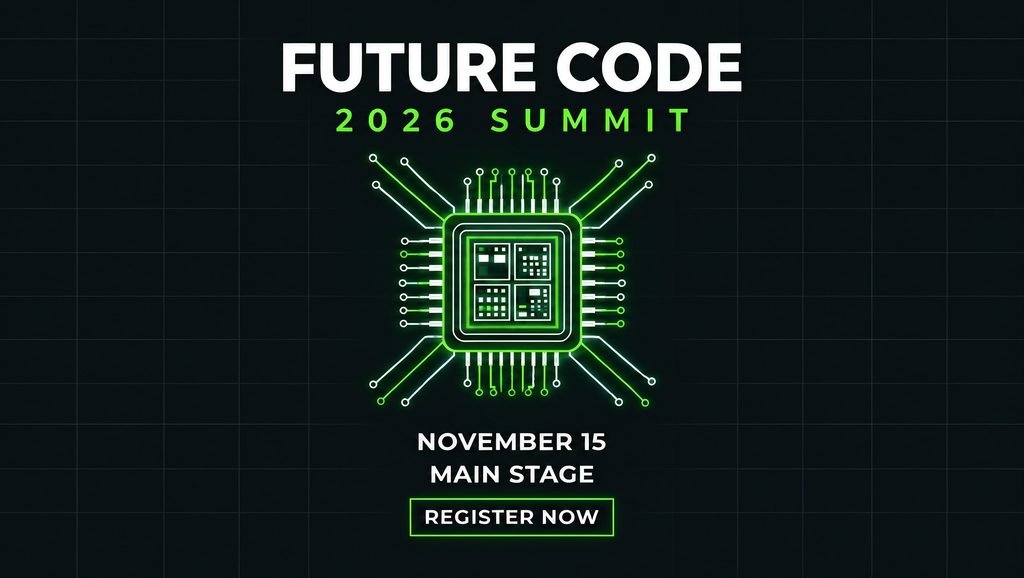
In my hands-on test, Craft separated the “FUTURE CODE” headline from the central microchip with surgical precision. Where single-pass models usually let the neon glow of the chip bleed into the bottom of the letters—or worse, hallucinate fake circuit-board text in the corners—Craft respected the negative space buffer completely. Zero phantom letters appeared in the grid lines, and the kerning on the sans-serif header looked like it was set by a human typographer.
Because Craft plans the layout first, it successfully isolates text blocks into distinct zones. It does not guess where words go; it places them according to the first-stage blueprint.
JSON Boundary Boxing and Editable Magic Layers
Creating an accurate layout only solves half the problem for marketers and designers. A finished graphic rarely survives contact with a client without revisions.
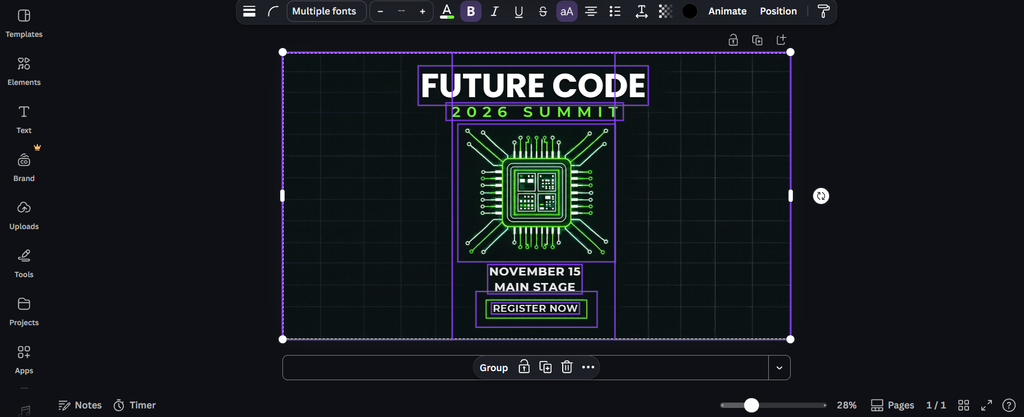
Because the planning model knows the exact coordinates of every object, it tags them using JSON boundary boxing. When you push a Craft generation into Canva’s Magic Layers, the platform uses those boundary boxes to slice the flattened image into fully editable design elements. Previously, the Canva also allow users to easily edit the flat image using Magic Layers.
You select a generated headline, change the font, or slide the main subject to the left without relying on destructive generative fill tools. The model translates the prompt directly into a layered, workable design file.
Comparative Analysis: Canva Craft vs. Single-Pass Generators (Midjourney v6 / Flux.1)
When you pit Canva Craft directly against industry heavyweights like Midjourney or Flux, the philosophical divide is immediately obvious.
Ask Midjourney for a coffee shop promotional flyer, and you will get breath-taking espresso crema textures and photorealistic steam—paired with a menu list that dissolves into gibberish and cannot be edited without taking the file into Photoshop to manually clone-stamp out the text.
Run that exact same workflow in Canva Craft, and while the raw photographic lighting is slightly more commercial than cinematic, the structural layout is miles ahead. Craft hands you a separated background, a movable coffee cup layer, and live text boxes you can double-click and rewrite in seconds. Midjourney paints a picture; Craft builds a graphic design file.
The API and Automated Production Workflows
Beyond the web editor, Canva exposes Craft to developers via its public API and the upcoming Model Context Protocol (MCP). This allows AI assistants and automated agents to call the model directly. A marketing team can programmatically generate launch graphics or social media banners as part of a larger data pipeline, knowing the two-stage model keeps the branding structure intact.
Looking ahead, the real game-changer for enterprise teams will be plugging the upcoming Craft-fast and Craft-ultrafast variants into automated pipelines. Imagine an e-commerce store with 10,000 SKUs hooking Craft-ultrafast into their inventory database via MCP: the moment a product goes on flash sale, an agent generates localized promotional graphics in 15 aspect ratios, verifies the JSON text coordinates, and pushes them live to ad networks in milliseconds without a human designer touching a mouse.
Canva Craft proves that training models on millions of human-made design templates—rather than just photographic stock libraries—changes how generative AI functions in commercial environments. It stops being a slot machine for pretty pictures and becomes a reliable engine for editable design.
The Verdict: Should You Switch Your Workflow?
Rating: 9/10 — Immediate Adopt (Buy/Switch)
If you are generating pure concept art or fantasy illustrations, stick with traditional diffusion models. However, if your job involves typography, layouts, social media assets, or client revisions, switch to Canva Craft immediately. Waiting on single-pass models to figure out post-generation layer separation is a waste of billable hours. Craft’s two-stage planning and JSON boundary boxing make it the first truly production-ready graphic design model on the market.